
MBS Mohammed Baobaid
All projects
Project
Public release Open Source Software Created 31 May 2026

MBS Terminal

A polished Windows Terminal setup for Laravel and PHP development environments that saves repeated local setup time.

MBS Terminal is a Windows development-environment project created after noticing how much time disappears when every machine, shell, and fresh setup needs the same terminal profile, prompt, PHP tooling, Composer setup, Laravel shortcuts, and restore path rebuilt by hand.

PowerShell C# .NET Framework Windows Terminal Starship Laravel Installer Composer PHP 8.2-8.5 Valet for Windows
Narrated walkthrough

This audio is not a word-for-word copy of the case below. You can read the written case while listening to me explain the project in more detail.

0:00 / 0:00
Speed
MBS Terminal project preview
v1.0.0 Release
Windows Platform
GUI + script Setup path
MIT License

Role

Open-source maintainer, Windows tooling builder, and Laravel developer-experience designer

Outcome

I packaged my preferred Laravel-ready terminal environment into a visual setup wizard, restore utility, PowerShell installer, Starship prompt config, Windows Terminal profile, pixel icon set, Laravel shortcuts, autocomplete behavior, and advanced documentation so the setup can be reused instead of repeated manually.

The Challenge

The recurring friction was not one hard setup step. It was the pile-up of small ones: choosing a terminal profile, wiring Starship, making PHP and Composer available, remembering Laravel shortcuts, cleaning directory output, adding icons, and still having a safe way to undo everything. Repeating that work on every development environment made the terminal feel like maintenance instead of leverage.

The Approach

I treated the terminal setup as a productized developer-experience workflow. The GUI handles the guided path, install.ps1 performs the actual configuration, Starship owns the prompt, PowerShell helpers own Laravel shortcuts and navigation behavior, Windows Terminal settings carry the visual shell, and the restore utility gives the setup a safe exit path. The repository keeps all of those pieces documented and versioned together.

How it works

The setup problem behind the project

I created MBS Terminal because setting up a comfortable Laravel development terminal was taking a little too much time each time I moved to a fresh environment. The project turns that repeated manual setup into a reusable installer with clear defaults and a restore path.
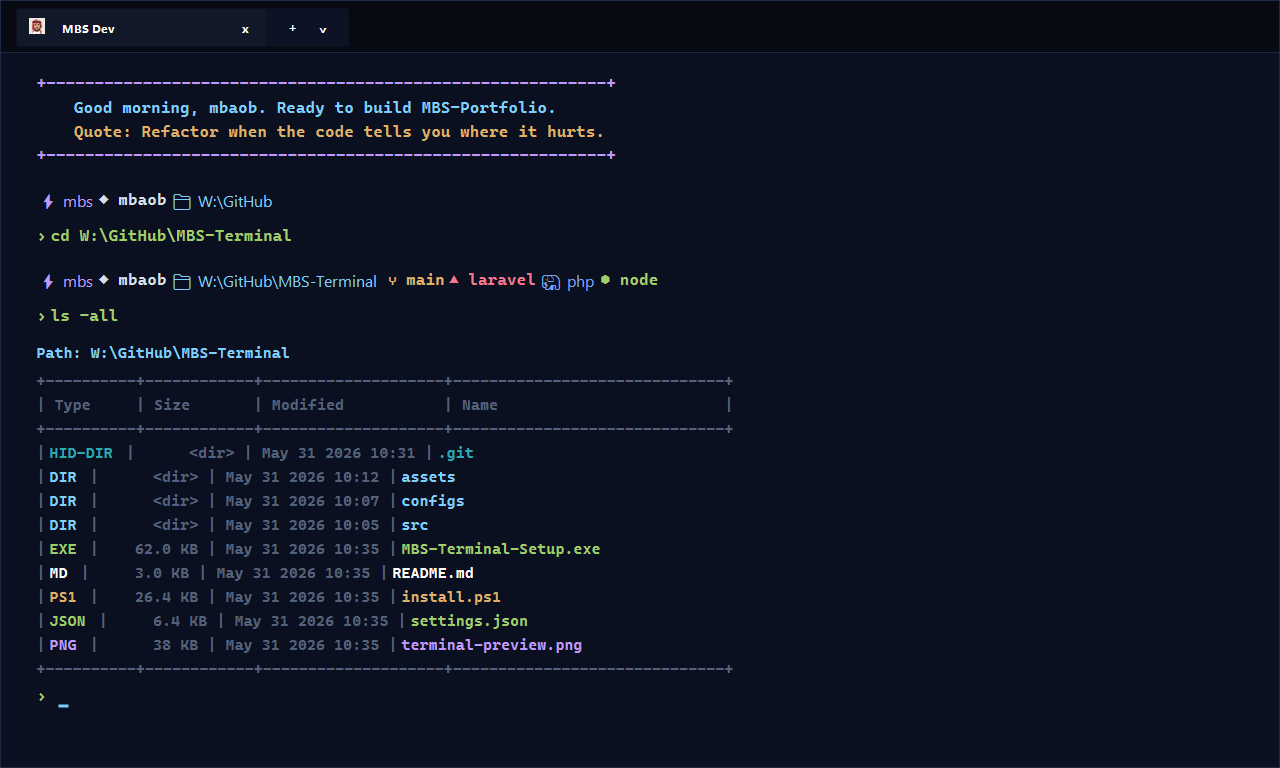

MBS Terminal preview showing a Laravel-ready Windows Terminal prompt
The terminal preview shows the MBS Midnight profile, Starship prompt, Laravel context, Git branch, PHP, Node, package, duration, and time segments.

A GUI on top of scriptable setup

The setup wizard gives the project a friendly install surface, but the real work stays scriptable in install.ps1. That keeps the project approachable for normal use and still inspectable for developers who want to review or adjust what is being changed.

Laravel shortcuts are treated as first-class workflow

The bundled PowerShell helpers focus on commands I use constantly in Laravel projects: pa migrate, pat, pclear, proutes, ptinker, ldev, and nr dev. They reduce typing without hiding the underlying Laravel command model.

Prompt and theme choices are practical, not only cosmetic

The Starship prompt surfaces the information that matters during development: directory, branch, Laravel project detection, PHP, Node, package context, command duration, and time. The MBS Midnight palette keeps contrast high while making different file and prompt states easier to scan.

Navigation and listing behavior match daily terminal use

The project adds a cleaner ls table, type-aware colors, hidden-file controls, file-only and directory-only filters, and an interactive folder navigator through empty cd or ls -nav. These are small touches, but they remove friction from the commands that happen all day.

Optional tooling keeps the installer useful across machines

The installer can optionally help with PHP 8.2, 8.3, 8.4, or 8.5, Composer, Laravel Installer, Valet for Windows, Laravel Pint, Envoy, Vapor CLI, Starship, and existing PHP directories from Laragon, XAMPP, Herd, or a custom build. That makes the project useful for both clean machines and already-partial setups.

Restore support makes the customization safer

Terminal customization can feel risky when it touches profiles and settings. MBS Terminal includes a restore executable and restore-default.ps1 so Windows Terminal settings, PowerShell profile hooks, Starship config, helpers, and icons can be backed up and moved aside if the user wants to return to defaults.

Results

  • Released `v1.0.0` with setup and restore executables plus source scripts
  • Created a reusable Windows Terminal profile and MBS Midnight color palette for development work
  • Added Laravel-focused command aliases and helper commands for common Artisan, test, route, tinker, and local dev workflows
  • Made the installer configurable for PHP versions, Composer, Laravel Installer, Valet for Windows, Pint, Envoy, and Vapor CLI
  • Included timestamped backups and a restore utility so users can safely revert terminal and profile changes
  • Documented prompt icons, Git status marks, colors, shortcuts, install flags, restore behavior, and build steps

Key features

01 Visual setup wizard for installing and configuring the terminal environment
02 Restore utility that safely returns Windows Terminal and PowerShell profile settings to defaults
03 MBS Midnight Windows Terminal theme with acrylic, custom tab styling, and profile icons
04 Starship prompt with Laravel, Git, PHP, Node, Python, package, duration, and time context
05 Laravel-focused PowerShell helpers such as `pa migrate`, `pat`, `pclear`, `proutes`, `ptinker`, `ldev`, and `nr dev`
06 Interactive folder navigation through empty `cd` and `ls -nav`
07 Optional installer support for PHP, Composer, Laravel Installer, Valet for Windows, Pint, Envoy, and Vapor CLI

Tech stack

PowerShell C# .NET Framework Windows Terminal Starship Laravel Installer Composer PHP 8.2-8.5 Valet for Windows
Project links

Interested in similar work?

I build systems like this for teams that need reliable engineering, clean interfaces, and measurable outcomes.