
MBS Mohammed Baobaid
All projects
Project
Personal build Mobile Application Created 1 January 2023

WhatToSay Application

An Arabic RTL Expo and React Native app that helps people find, copy, and request better replies for everyday phrases.

Created 1 January 2023, WhatToSay is an Arabic-first mobile app built around a simple question: when someone sends you a message, what should you say back? I designed the Figma interface and developed the Expo React Native app end to end, including RTL layout handling, API-powered phrase search, reply suggestions, bottom-sheet creation flows, custom Arabic typography, and a visual system based on the yellow, white, charcoal, and orange palette from the design board.

Expo 47 React Native JavaScript React Navigation Axios AsyncStorage NetInfo Gorhom Bottom Sheet Expo Clipboard WebView EAS Build
Narrated walkthrough

This audio is not a word-for-word copy of the case below. You can read the written case while listening to me explain the project in more detail.

0:00 / 0:00
Speed
WhatToSay Application project preview
Expo Platform
Arabic RTL Interface
5+ Core screens
API-backed Data flow

Role

Mobile app designer and developer

Outcome

I designed and developed the full mobile experience: Arabic RTL screens, live backend requests, post detail pages, copy-to-clipboard reply actions, privacy-policy flow, offline handling, and EAS-ready app metadata.

The Challenge

The app needed to feel native for Arabic users while staying lightweight enough to build and iterate quickly. That meant respecting RTL layout from the first screen, keeping repeated phrase cards easy to scan, making reply copying instant, and connecting the interface to a small backend API without overcomplicating the mobile codebase.

The Approach

I designed the Figma board first, then structured the project around a small Expo app shell, React Navigation stack screens, reusable theme constants, focused post-service API helpers, and repeated UI partials for cards, headers, skeletons, and bottom sheets. The design board drove the interface language: yellow action surfaces, soft white cards, dark charcoal text, bottom-sheet creation, and compact mobile-first spacing.

How it works

The design board set the product language

Before implementation, I designed a focused Figma board: a white and charcoal base, yellow primary actions, orange/red utility colors, rounded reply cards, and three core mobile states for home, details, and create. I used that board as the source of truth for the React Native screens so the finished app matched the intended Arabic RTL interaction instead of drifting into a generic mobile layout.
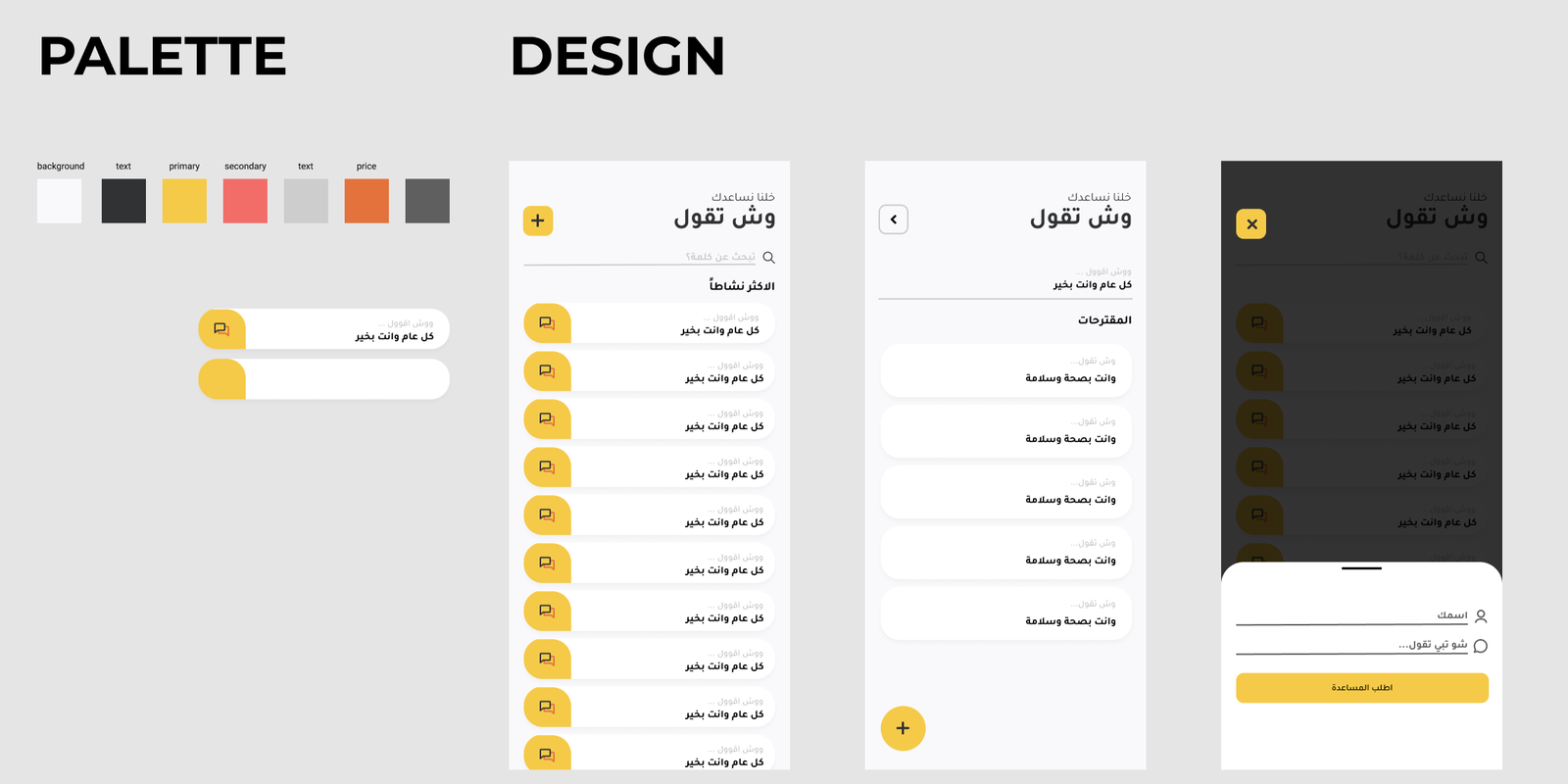

WhatToSay Figma design board showing the palette, home screen, details screen, and create bottom sheet
The source Figma design board that guided the palette, mobile card system, detail view, and bottom-sheet creation flow.

I built the app around an Arabic-first interaction

The main experience is intentionally direct: open the app, search for a phrase, tap into the detail screen, and copy a suitable reply. Because the product is Arabic-first, I used React Native RTL handling, right-aligned inputs, Arabic copy, and DINNext font assets so the UI felt designed for the language rather than translated after the fact.

Expo made the mobile build practical

The app runs on Expo 47 with React Native 0.70.5, which kept setup, asset loading, fonts, splash screens, platform configuration, and EAS metadata in one manageable mobile workflow. The app.json file defines the Arabic app name, iOS bundle identifier, Android package, adaptive icon, splash image, and EAS project id.

The data layer stayed small and readable

The API surface is concentrated in PostService.js, which wraps Axios calls for posts, search, and post/{id}. Creation flows post directly to post/create and post/{id}/create/reply, keeping the mobile layer focused on the screens and the backend responsible for phrase and reply storage.

Bottom sheets matched the creation flow

Adding a new phrase or reply happens through a bottom sheet instead of a separate full-screen page. I designed that interaction to keep the user anchored in context, then developed each form with body validation, privacy-policy consent, success feedback, error feedback, and navigation to the created or matched post.

Small mobile details mattered

The app includes loading skeletons for API waits, a no-connection screen powered by NetInfo, a WebView privacy policy page, Expo Clipboard integration for suggested replies, and modal feedback for copy, report, success, and validation states. These details make a compact app feel more complete.

What this project shows

WhatToSay shows my early end-to-end product range: designing the visual board, turning it into React Native screens, wiring an Arabic RTL app to a backend API, managing Expo assets and build metadata, and keeping the interface focused around one practical everyday workflow.

Results

  • Built a working Arabic RTL mobile app with splash, home, detail, create, privacy, no-connection, and test screens
  • Integrated the backend endpoints for listing posts, searching phrases, fetching post details, creating posts, and adding replies
  • Implemented reply copy feedback through Expo Clipboard and user-facing confirmation modals
  • Used Gorhom Bottom Sheet for native-feeling creation and reply flows instead of full-page forms
  • Centralized the palette and custom DINNext font usage so the app stayed close to the supplied design system
  • Prepared platform metadata for Expo/EAS builds, including iOS bundle identifier, Android package, icons, and splash assets

Key features

01 Arabic RTL interface using custom DINNext fonts and React Native RTL configuration
02 Home feed with API-backed popular posts, search, loading skeletons, and gesture-based report action
03 Post detail screen with suggested replies, author labels, report action, and copy-to-clipboard feedback
04 Bottom-sheet forms for creating new phrases and adding replies with validation and privacy-policy consent
05 Connectivity guard that displays a no-connection state before rendering API-dependent screens
06 Expo app configuration for iOS, Android, splash assets, adaptive icon, and EAS project metadata

Tech stack

Expo 47 React Native JavaScript React Navigation Axios AsyncStorage NetInfo Gorhom Bottom Sheet Expo Clipboard WebView EAS Build
Project links

Interested in similar work?

I build systems like this for teams that need reliable engineering, clean interfaces, and measurable outcomes.